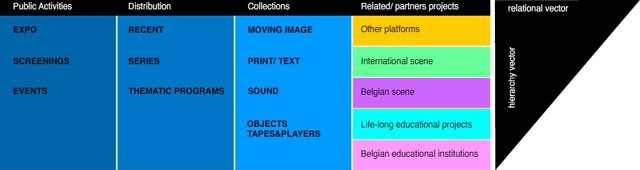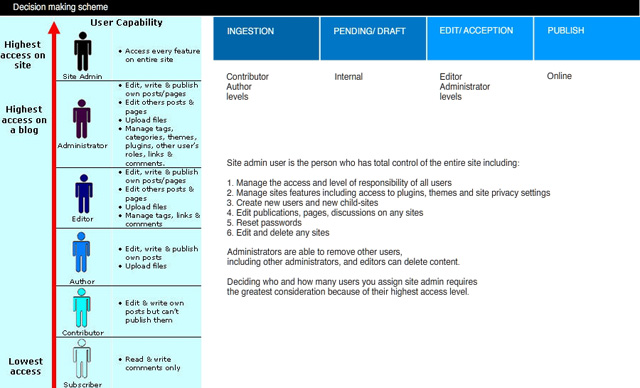
1. Architecture and structure. Priorities. Workflows.
2. Permanent locations for files on servers, permalinks.
Images, texts, videos.
3. Publishing – Archiving. / MySQL, PosgreSQL, … /
Types of electronic publications captured by archival repository.
4. Definition of records which constitute permanent publication worthy of long-term preservation.
5. Roles and responsibilities within organisation and network.
Decision tree.
6. Naming conventions.
Metadata needs to be kept. Unique identifiers
7. Internal publishing workflow.
Status of electronic publications within organisation and broad definitions of what they constitute.
8. Integration of commonly used online tools. (example – Google calendar)
9. Collection/ archive description. Plan.
Priorities for collection/ archive to be researched and published.
10. Contacts and documents management tools.
11. Online video publishing and management tools.
12. Mapping tools for batching existing databases.
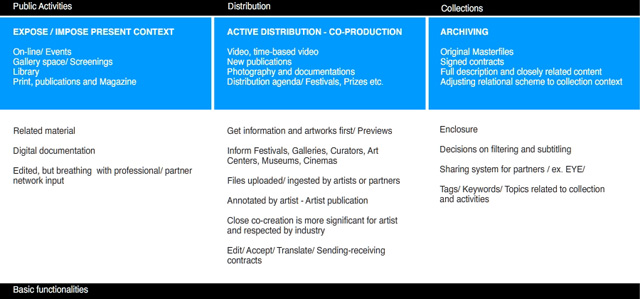
Example of prototype scheme for content placement.
Architecture and structure. Draft for Argos Centre for Art and Media. Maxim Surin 2010.
Subject/ Topic – related navigation.
Functionality is more important than design.
Changeable/ movable/ extendibility/ customization of components
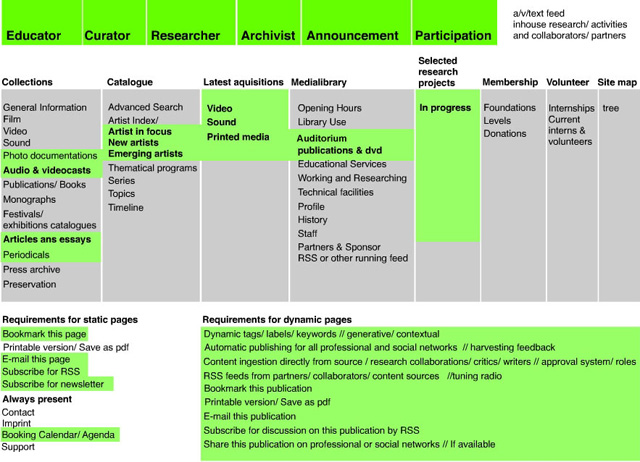
Redefining your WordPress workflow
Features
- Custom Statuses Define custom statuses that are specific to your newsroom and your workflow
- Editorial Comments Leave comments within WordPress to give feedback on articles. Bring conversation into your editorial workflow
- Email Notifications & User Groups Keep track of activity via email updates. Create user groups to better manage alerts
Screenshots


There are a few key components to this project:
- Improving the meta data on top of posts to better reflect the information that needs to be recorded about an assignment;
- Empowering newsrooms, blog networks and multi-user blogs to manage more of their editorial workflow from within the WordPress admin; and
- Building out a way to track all of this active meta data within the system as a way of visualizing content and priorities at a glance.
More details can be found on the Edit Flow website
Stage 1: Custom Post Statuses
Enables users to create custom statuses for posts, and assign those to posts.
Adding/Editing/Managing Custom Statuses
- Upon activation, the plugin adds five default statuses (“Assigned”, “Draft”, “Pending Review”, “Pitch”, “Waiting for Feedback”). These can all be edited or deleted (with the exception of “Draft” and “Pending Review”, which can only be deleted). Users can also add additional custom statuses. Overall, we tried to make this as flexible as possible, acknowledging the extreme diversity in workflows and requirements across different newsrooms.
- The “Add/Edit/Manage Custom Statuses” screen is reminiscent of the interface used to manage categories and tags. From a design stand-point, we tried to keep with standard WordPress interface conventions (to minimize the learning curve) and, similarly, make the plugin as less intrusive as possible.
Assigning Custom Statuses to Posts
- With custom statuses defined, they can now be assigned to posts. The plugin adds the custom statuses to the “Status” dropdown when editing a post (screenshot above). Additionally, given the likely frequency of use of this feature, the Status dropdown is made visible by default. The plugin also allows you to set a default status for new posts, which WordPress sets to “Draft” by default.
Managing Posts
- A new column is added to the Edit/Manage Posts screen that indicates the current status of the post. Additionally, the posts on this screen can be filtered by status, by clicking on the links at the top.
- To ease the management of content, a new column is added to the Edit/Manage Posts screen that indicates the current status of the posts displayed. Additionally, the posts on this screen can be filtered by status, by clicking on the links at the top.
Dashboard Widget
- Dashboard widget that gives you a quick glance of the state of currently unpublished content. As this was a last minute addition, it’s minimal and largely unstyled, but something we’ll clean up and build out more in the coming days.
Stage 2: Post Metadata and Editorial Commenting
Post Metadata
- Basic fields to allow you to capture some additional data for each article.
Quick Pitch
- Similar to QuickPress, this dashboard widget allows users to create a new pitch for an article.
Editorial Comments
- Edit Flow now supports editorial comments. Discussions on posts/articles can now take place between editorial staff within the WordPress Administration interface. This can cutdown on long-winded back-and-forth email threads as all comments are conveniently displayed within the Edit Posts page and better facilitate online workflows. Threading is supported (assuming it’s enabled on your install)
Notifications
- Basic email notification support. Email notifications are delivered when a post’s status changes or an editorial comment is added to a post. Notifications are delivered to: ** Post author and Administrators, by default; ** Any specified roles (under Edit Flow > settings); and ** Any users that comment on posts.
Stage 3: Usergroups
- Feature called usergroups. It’s sort of like roles, except that it just provides a way for you to group users that perform similar roles in your organization into cohesive virtual groups. Once grouped, usergroups can be subscribed to posts, so that all members receive post updates. This is just the start! We’re looking a bunch of cool things to do with usergroups down the road.
- Speaking of notifications, you can now select which users should receive notifications for specific posts!
- Again on the topic of notifications, we’ve made emails a bit more specific in the type of information they contain as well some specific action links that’ll probably save you a bunch of time.
Tagged with:
DIGICULT •
digimag •
digital preservation •
e-culture •
Edit Flow •
editorial •
institution •
manual •
network •
online magazine •
research •
WordPress